Chores NestChores Nest

Organize family life in one place

Chores Nest is an offline-first household productivity app that brings together shared calendars, chore rotations, synchronized grocery lists, expense budgeting, and private document vaults. Built for families, couples, and roommates who want a shared place for everyday plans.

Chores Nest on Product HuntChores Nest on VibeRankChores Nest on LaunchNestFeatured on LaunchIgniter
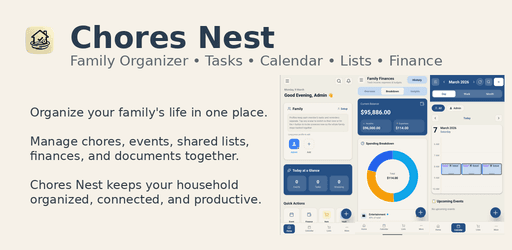
Chores Nest family organizer dashboard interface showing calendar, tasks, and grocery lists

Live Product Walkthrough

See the household dashboard in action

The dashboard brings together chores, calendars, shopping lists, expenses, documents, and notes. Use it to review household plans and assignments. Sharing changes between devices requires an internet connection.

Shared chores
Grocery lists
Household calendar
The Household Productivity Problem

How does a shared family organizer reduce household chaos?

A shared family organizer gives household members a place to view schedules, chore assignments, grocery lists, and expenses. Recurring tasks and reminders can support the routine you agree on together.

Household plans can become difficult to follow when they are spread across separate calendars, notes, and message threads. A shared place for appointments and responsibilities can make those plans easier to review.

Chores Nest brings task assignments, recurring schedules, and reminders together. Use it to record who is responsible for each job and adjust the plan as household needs change.


Complete Feature Architecture

What are the 6 core pillars of the Chores Nest dashboard?

Chores Nest combines six essential management systems into one unified workspace: shared calendars, chore tracking, categorized grocery lists, household budgeting, secure document vaults, and collaborative family notes.

1. Shared Family Calendar

Color-Coded Multi-Member Scheduling

Keep school events, appointments, work shifts, and family activities in a shared calendar. Use member colors and reminders to organize upcoming plans.

2. Chores & Task Management

Automated Rotations & Accountability

Assign chores, set due dates and recurring schedules, rotate responsibilities, and review completion with your household.

3. Shared Grocery Lists

Aisle-Sorted Real-Time Synchronized Lists

Create shared shopping checklists with categories such as produce, dairy, and pantry. Household members can add items and mark purchases as updates sync between connected devices.

4. Household Finance Tracker

Shared Expense Logs & Budget Envelopes

Record utilities, rent, groceries, and home maintenance expenses. Organize spending by category and review household budgets.

5. Secure Document Vault

Encrypted Storage for Critical Family Records

Organize household documents such as insurance policies, appliance warranties, and receipts in the vault. Review access and backup settings before relying on it for important records.

6. Notes & Household Journals

Shared Recipes, Checklists & Instructions

Maintain a collaborative home knowledge base. Store appliance operating instructions, family recipes, pet care schedules, babysitter briefings, and emergency contacts in searchable, organized notebooks accessible by all members.

Ways to coordinate a household

Compare apps, chore charts, and group chats

Chores Nest combines chore schedules, shopping lists, and household records in one app. Paper charts and group messages are other ways to coordinate. Choose the approach your household finds easiest to maintain.

Feature & CapabilityChores Nest AppPaper WhiteboardsWhatsApp / Group Chats
Offline FunctionalityAccess to locally saved records; sharing needs a connectionLocal only, no remote notificationsOffline access depends on the messaging app
Chore Rotation AutomationRecurring chores and rotation settingsManual erasing and rewriting requiredTasks recorded in messages; tools vary by app
Grocery List CategorizationShopping lists with categoriesCategories can be written by handLists shared as messages
Storage and sharingLocal records and household sharing optionsAccess depends on where the chart is keptStorage and privacy depend on the provider
Technical Reliability & Privacy

Offline access and household data

Offline access lets you use records already saved on your device. Sharing changes between devices requires a connection. Offline storage alone does not guarantee privacy or security; review the app settings and privacy policy for those details.

Locally saved records

Use locally available lists and records when your connection is unavailable. Features that require online services still need internet access.

Privacy settings

Review app lock, document access, and data export options. The privacy policy explains how information is collected, used, and shared.

Sharing updates

Reconnect to share changes with other household members. Review the latest list after syncing, particularly when several people have edited it offline.

Getting Started Framework

Set up your household in four steps

Create your family space, invite household members, add recurring chores, and start a shared grocery list. Review the setup together and adjust it to your routine.

Step 1

Create your family space

Download Chores Nest and set up your household profile. Name your space, select customized color badges for each member, and invite partners, children, or roommates using a secure invite link.

Step 2

Add recurring chores

Add recurring domestic chores such as dishwashing, trash disposal, vacuuming, and bathroom cleaning. Choose a recurring schedule and review assignments with your household.

Step 3

Start a shared grocery list

Add your weekly pantry staples into the categorized grocery manager. When anyone notices low olive oil or coffee beans, they add it to the shared list for whoever visits the market next.

Step 4

Add events and household documents

Input upcoming family appointments, school holidays, and garbage pickup dates into the shared calendar. Upload home warranty receipts and emergency contact details into the document vault.

From the blog

Practical guides for a calmer home

Compare family organizers and find simple routines for groceries, chores, and household spending.

Common Questions & Answers

Questions about Chores Nest

How sharing, reminders, privacy, and offline access work for your household.

What is Chores Nest and how does it work?

Chores Nest brings chore assignments, grocery lists, shared calendars, household budgeting, and document storage into one app. Household members can share updates when their devices are connected to the internet.

Does Chores Nest work without an active internet connection?

Chores Nest supports offline access to locally saved records. An internet connection is needed to share updates between devices and use features that depend on online services.

How does Chores Nest help couples divide household chores fairly?

Chores Nest lets you assign chores, set recurring schedules, rotate responsibilities, and review completion. These tools give household members a shared record to discuss and update.

How do shared grocery lists work?

Household members can add items, organize them by category, and mark purchases on a shared list. Updates between devices need an internet connection. Check the latest list before shopping.

Is my family's personal data, calendar, and document vault secure?

Chores Nest includes local storage, app lock settings, and a document vault. Review the privacy policy for details about data collection, service providers, analytics, and sharing.

Can roommates and blended families use Chores Nest?

Families, couples, and roommates can use Chores Nest to organize shared tasks, calendars, lists, and household expenses.

How much does Chores Nest cost to use?

Chores Nest is available to download on Google Play. This website also offers a free chore chart generator and grocery list maker. Check the current app listing for purchase and subscription details.

How do I invite my family members or partner to my household space?

Use the family member invitation options in the app to share an invite link or code. Joining and sharing updates require an internet connection.

Keep your household plans together

Download Chores Nest today to synchronize chores, grocery lists, family calendars, and shared finances in one private, offline-first application.